Virtual Staging
Transform empty rooms into beautifully furnished spaces with style presets.
Tips for best results
• Upload photos of empty or mostly empty rooms
• Well-lit rooms with visible walls and floors work best
• Straight-on or slight-angle shots produce cleaner results
• Walls, floors, and windows are never altered
Upload an empty room
Choose a style preset and watch it come to life.
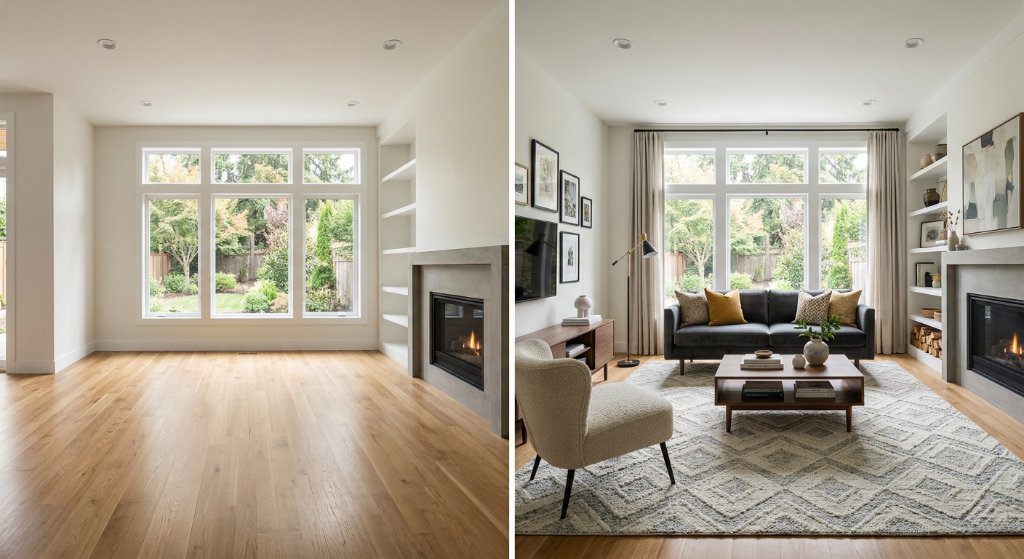
Empty room → Professionally staged
Style presets add realistic furniture, lighting, and decor — walls and floors are never altered.
How AI virtual staging works
AI virtual staging turns an empty room into a furnished, listing-ready photo in four quick steps. First, upload a photo of the empty room — a clean, well-lit shot with visible walls and floors works best. Second, choose the room type (living room, bedroom, dining room, and more) so the AI knows what furniture to place. Third, pick a staging style from the presets — Modern Minimalist, Scandinavian, Luxury Contemporary, and others — and the AI furnishes the room with realistic furniture, lighting, and decor. Fourth, download the staged image and use it on the MLS, Zillow, and your social media, labeled as virtually staged where your local rules require. The whole process takes under a minute per photo, with no designer, no waiting, and no per-image fee.
Which room and style to choose
The tool supports eight room types — living room, bedroom, dining room, home office, kitchen, bathroom, balcony, and patio — so you can stage every space in a listing consistently. Choosing the right room type helps the AI place furniture that actually fits the space, which keeps the result believable.
The six staging styles each suit different listings. Modern Minimalist works for sleek condos and new construction where clean lines sell the lifestyle. Luxury Contemporary fits higher-end homes with premium finishes. Scandinavian is warm and bright, ideal for smaller spaces that benefit from a light, airy look. Traditional Classic suits older or character homes where modern furniture would feel out of place. Coastal / Beach is made for waterfront and vacation properties. Industrial Loft fits downtown lofts and exposed-brick interiors. Matching the style to the property's real character is what makes a staged photo feel authentic rather than generic.
Virtual staging vs traditional staging
Traditional physical staging can run into the thousands of dollars per listing and take days to schedule, deliver, and set up. Virtual staging delivers a finished image in seconds at a fraction of the cost. The trade-off is that virtual staging doesn't help in person — buyers touring the home still see an empty room, so it's a marketing tool, not a replacement for physical staging in every case.
Physical staging is still the right call for high-end listings where the in-person experience matters, or vacant homes where you can afford the furniture. For online listings, MLS photos, and generating showings, virtual staging is the faster, cheaper option. Many agents use both: virtual staging for the listing photos and a few key pieces of physical furniture for in-person tours.
What it costs
Agent Copilot AI offers virtual staging as part of a single $29-per-month plan with unlimited use — stage as many rooms and properties as you want. That's a different model from per-image services, which typically charge roughly $1 to $30 per staged photo and bill you every time you revise a room.
With a flat subscription you can iterate freely: try a second style, restage a room after feedback, or stage an entire portfolio without watching the cost climb. There's a 7-day free trial with no credit card required, so you can stage your first listing before deciding. One plan covers all thirteen tools, not just staging.
Disclosure and MLS rules
Most MLSs and state real estate rules require virtually staged photos to be clearly labeled as virtually staged, so buyers know the furniture isn't real. The intent is simple: a buyer who tours an empty room they expected to be furnished is not a happy lead.
Check your local MLS rules and your state association's guidance before publishing staged photos — requirements vary, and some MLSs ask for a specific label or a separate set of photos. When in doubt, label the photo and keep an original empty-room version on hand. Honest disclosure protects your reputation and keeps your listings compliant.
Frequently Asked Questions
How much does virtual staging cost?
With Agent Copilot AI it's a flat $29 per month for unlimited staging — no per-image fees. Most per-image services charge roughly $1 to $30 per photo, which adds up fast across a listing. One subscription covers every room and every property.
How long does AI virtual staging take?
Most images finish in under 30 seconds. You upload the empty room, pick a style, and the AI furnishes it while you wait. There's no queue and no turnaround time to plan around.
Do I have to disclose that a photo is virtually staged?
Yes — most MLSs and state rules require virtually staged photos to be clearly labeled as virtually staged. Disclosure protects buyers and keeps you compliant with local listing rules. Always check your MLS and state requirements before publishing.
What kind of photo works best?
A clean, well-lit photo of an empty or mostly empty room works best. Straight-on or slight-angle shots with visible walls and floors produce the cleanest results. Avoid cluttered rooms and very dark images.
Can it stage a room that already has furniture in it?
It's designed for empty rooms, so furniture already in the frame can lead to overlapping or awkward results. For furnished rooms, remove the existing furniture first or use the AI Declutter tool to clear it. Virtual staging works best on vacant spaces.
What image resolution do I get?
You receive a high-resolution image ready for MLS, Zillow, and social media. The output matches the quality of the input photo, so higher-resolution uploads produce sharper staged images. Download the result and use it anywhere.
Can I use the staged images on the MLS and Zillow?
Yes — the images are yours to use on the MLS, Zillow, and your marketing, as long as you follow each platform's disclosure rules for virtual staging. Label the photos as virtually staged where required. Check your local MLS guidelines before listing.
Is virtual staging worth it for rentals?
Yes — staged rental photos consistently draw more views and inquiries than empty rooms, which means shorter vacancy periods. At a flat monthly rate you can stage every unit without watching per-image costs. It's especially valuable for higher-end rentals.
Related tools
More AI tools built for real estate agents.
AI photo declutter
Remove clutter and unwanted objects from listing photos in one click.
Day to dusk conversion
Turn flat daytime exteriors into dramatic dusk and golden-hour shots.
MLS description writer
Generate Fair Housing-compliant MLS copy from the property's features.