AI Declutter / Remove Objects
Remove clutter and unwanted objects from your listing photos.
Tips for best results
• Use a well-lit, high-resolution photo
• If there's a lot of clutter, use the brush to paint over items for best results
• For a few items, just describe what to remove in the text field below
• Works best on interior listing photos
Upload a listing photo
Upload a photo, optionally mark areas to remove, and let AI clean it up.
Clutter removed automatically
AI removes unwanted objects and restores the background seamlessly.
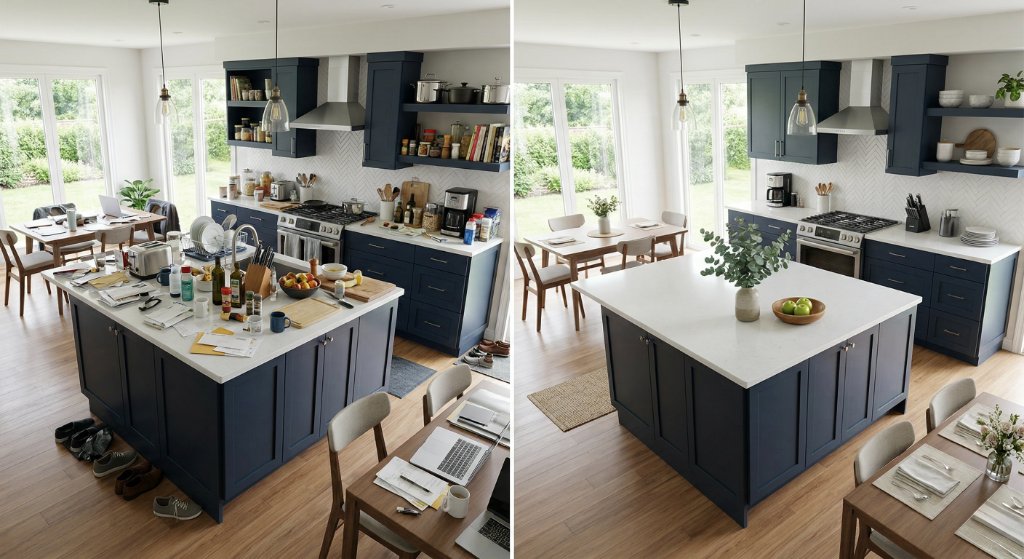
How AI photo decluttering works
Decluttering a listing photo takes three steps. Upload the photo you want cleaned up — a normal listing shot straight off the camera or phone is fine. Then tell the tool what to remove, in either of two ways: paint directly over the objects with the brush, adjusting the brush size for small items like a remote control or large ones like a parked car, or simply describe what you want gone in the text box. You can do both on the same photo when some objects are easier to point at than to describe.
The AI then removes what you marked and reconstructs what should be behind it — the floor, the wall, the counter, the lawn. That reconstruction is the part that separates a usable result from an obvious edit, and it is why the tool does more than blur or clone. When it finishes you get a before-and-after slider so you can drag across the image and confirm the background looks right before you download.
What to remove, and what to leave alone
The highest-value removals are the ones that distract a buyer from the room: bins and recycling boxes, cars on the driveway, hoses and cables, cluttered countertops, laundry, pet bowls and litter trays, toys, and the small personal items that make a buyer feel like they are looking at someone's house rather than their own future one. Exterior shots benefit most from removing vehicles, wheelie bins, and overhead cables.
There is a line worth respecting. Removing clutter is presenting the property at its best; removing a permanent defect is not. Cracks, damp patches, damaged flooring, missing fixtures and anything a buyer would reasonably expect to find disclosed should stay in the photo. Editing those out invites exactly the complaint you do not want, and in many jurisdictions it creates a disclosure problem rather than a marketing one. A good rule: if it would still be there on move-in day, leave it in the picture.
Getting a clean result first time
Start with the best version of the photo you have. Decluttering works from the pixels it is given, so a sharp, well-lit, straight-on shot reconstructs more convincingly than a dark or heavily angled one. If you have both a wide shot and a tighter one of the same room, clean the tighter one first — there is less background to rebuild.
Be generous with the brush at the edges of an object. Marking slightly beyond the outline gives the AI room to blend, whereas a mask that stops exactly at the edge often leaves a faint halo. For objects sitting against a busy background — a chair against patterned wallpaper, a bin against a hedge — expect to review the result closely, and consider removing one object at a time rather than several at once.
Where decluttering fits in a listing workflow
Decluttering is the first step of photo preparation, not the last. Clean the room first, then stage it if it is empty, then handle the exterior light. Running the steps in that order means each one works on a tidy image rather than compounding whatever the previous step left behind.
In practice most agents use it in two moments: on the photos that came back from the shoot with something distracting in frame that nobody noticed on the day, and on seller-supplied photos for a listing where a full shoot is not justified. It is also the fastest fix for a listing that is already live and underperforming, because you can replace a photo without rescheduling anything.
Every tool on Agent Copilot AI is included in one $29-per-month plan with unlimited use, rather than being billed per image or per document. There is a 7-day free trial and no credit card is required to start, so you can run a real listing through it before deciding.
Frequently Asked Questions
Does AI decluttering change the room itself?
No. It removes objects you mark or describe and reconstructs the surface behind them — floor, wall, counter, grass. It does not move walls, change dimensions or add furniture. If you want an empty room furnished, that is virtual staging, which is a separate tool.
Do I have to disclose a decluttered photo?
Rules vary by MLS and by state, and they generally focus on material misrepresentation rather than tidying. Removing a bin or a car is normally treated differently from removing a defect. Check your local MLS rules, and never edit out damage, cracks, damp or missing fixtures.
Can I remove more than one object at a time?
Yes, you can mark several objects in one pass. For objects sitting against a busy or patterned background, working through them one at a time usually produces a cleaner reconstruction.
Does it work on exterior photos?
Yes. Exteriors are one of the most common uses — removing parked cars, wheelie bins, hoses, signage and overhead cables from the front elevation of a property.
What kind of photo works best?
A sharp, well-lit, reasonably straight-on shot. The AI rebuilds the background from the surrounding pixels, so the more clearly it can see what should be behind an object, the more convincing the result.
Related tools
More AI tools built for real estate agents.
Virtual staging
Furnish empty rooms with AI-generated interior design styles.
Day to dusk conversion
Turn flat daytime exteriors into dramatic dusk and golden-hour shots.
Floor plan colorizer
Transform black-and-white floor plans into color-coded visuals.