Floor Plan Colorizer
Transform plain black-and-white floor plans into color-coded, client-ready visuals.
Tips for best results
• Upload a black-and-white floor plan (PNG or JPG screenshot)
• Clear room labels help the AI identify spaces accurately
• Higher resolution images produce sharper results
• Walls, dimensions, and text remain unchanged
Upload a few photos of the actual property so the AI can match its real look and finishes.
Upload a floor plan
Black-and-white builder PDFs or MLS floor plans work great.
Black-and-white plan → Color-coded visual
Each room gets a distinct color fill while walls, doors, and dimensions remain exactly the same.
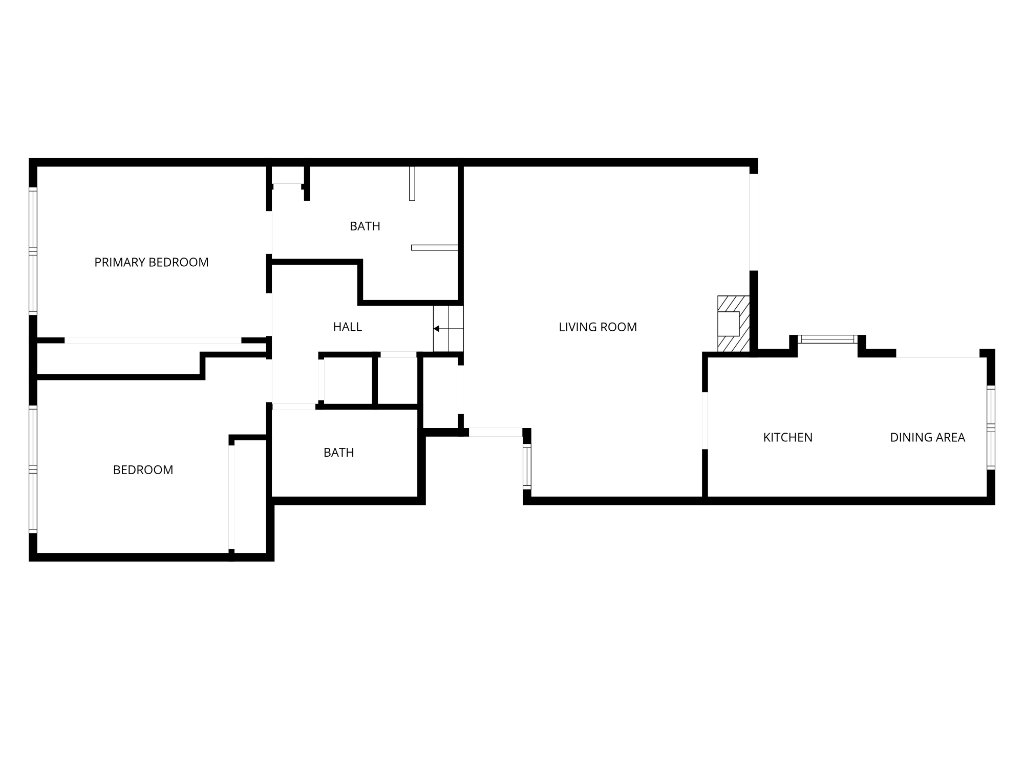 Before
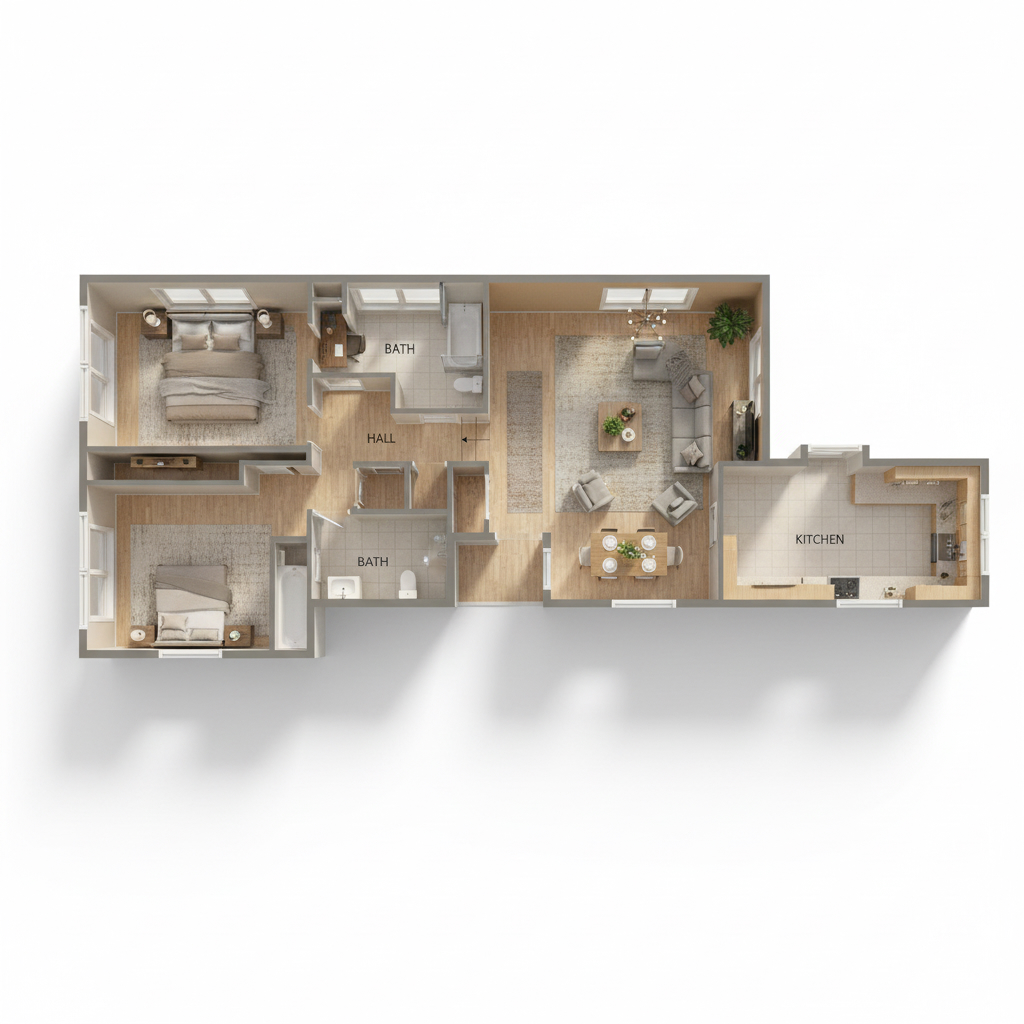 After
AfterHow the floor plan colorizer works
Upload a black-and-white floor plan — a surveyor's drawing, a developer's plan, a scan from an old brochure — and the tool turns it into a coloured, marketing-ready graphic. You pick a colour palette and a floor treatment, and the AI applies them room by room, shading each space and rendering the floor finish so the plan reads as a place rather than a technical drawing.
Five palettes are available. Warm Neutral in tan and cream is the safe, broadly appealing default. Cool Modern in grey and white suits contemporary and new-build properties. Luxury Dark in navy and gold is made for higher-end listings and prints well on a brochure. Pastel Soft in pink and mint is lighter and works for smaller residential spaces. Bold Color gives each room its own distinct shade, which is the clearest option when the point of the plan is to show how the space divides.
Floor finishes and why they matter
Separately from the palette you choose a floor treatment: Light Hardwood, Dark Hardwood, Concrete, Carpet, or Let AI decide. This is the setting that does most of the work in making a plan feel like a home, because a floor texture gives each room a material identity that flat colour blocks do not.
Match the finish to the actual property where you can. A plan showing dark hardwood for a property with pale tile will confuse a buyer who then walks in. Where a property mixes finishes, or where you are producing a plan for a development that has not been fitted out, Let AI decide is the sensible option — it applies a coherent treatment without asserting a specific material.
Getting an accurate result
Clear room labels are the single biggest factor in the quality of the output. The AI identifies spaces partly from the text on the plan, so a drawing where 'Kitchen', 'Bedroom 2' and 'Ensuite' are legible will be shaded far more accurately than one where the labels are tiny, rotated or missing. If you are scanning an old brochure, scan it at a higher resolution than you think you need.
Straight, clean scans also help. A photographed plan at an angle, with a shadow across one corner, gives the AI a distorted geometry to interpret. If the plan is multi-storey, process each floor separately rather than uploading a sheet with all of them at once — the result is cleaner and you get individual images you can use separately on the listing.
Where a coloured floor plan earns its place
Floor plans are consistently among the most-viewed elements of an online listing, because they answer the question photos cannot: how the space actually works. A buyer looking at eight photos of individual rooms still does not know whether the kitchen opens to the garden or whether the second bedroom is off the hallway. The plan tells them in one glance.
A coloured plan extends that. It survives being shrunk to a thumbnail on a phone, which a fine-line technical drawing does not, and it holds up on a printed brochure and on a social post where a grey line drawing disappears. For listings where the layout is the selling point — an open plan, a clever extension, a flexible room that could be an office or a fourth bedroom — it is usually the single most persuasive image in the set.
Every tool on Agent Copilot AI is included in one $29-per-month plan with unlimited use, rather than being billed per image or per document. There is a 7-day free trial and no credit card is required to start, so you can run a real listing through it before deciding.
Frequently Asked Questions
What kind of floor plan can I upload?
Any black-and-white plan image — a surveyor's drawing, a developer's plan, or a scan from a brochure. Clear, legible room labels and a straight, high-resolution scan produce the most accurate shading.
Which palette should I choose?
Warm Neutral is the safe default for most residential listings. Cool Modern suits contemporary properties, Luxury Dark suits higher-end listings and prints well, Pastel Soft suits smaller spaces, and Bold Color is clearest when the point is showing how the space divides.
Can I handle a multi-storey property?
Process each floor separately rather than uploading one sheet containing all of them. The result is cleaner and you get individual images you can use independently in the listing.
Should the floor finish match the real property?
Where you know the finish, yes — a plan showing dark hardwood for a property with pale tile will confuse buyers. Where finishes are mixed or the property is unfitted, use Let AI decide.
Why do room labels matter so much?
The AI identifies spaces partly from the text on the drawing. Legible labels mean rooms are shaded correctly; tiny, rotated or missing labels lead to spaces being misread.
Related tools
More AI tools built for real estate agents.
Virtual staging
Furnish empty rooms with AI-generated interior design styles.
AI photo declutter
Remove clutter and unwanted objects from listing photos in one click.
MLS description writer
Generate Fair Housing-compliant MLS copy from the property's features.